
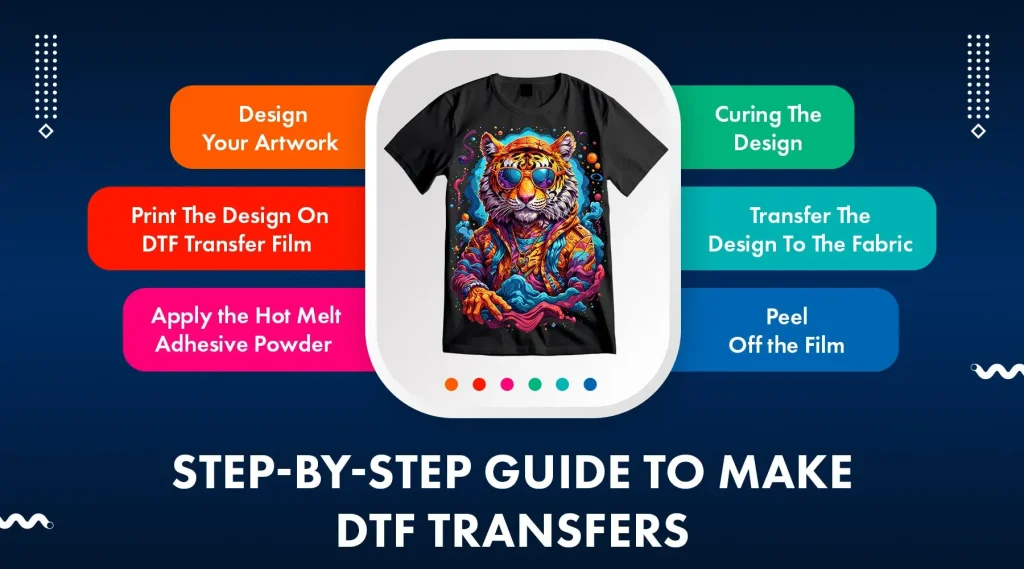
DTF template guide is your roadmap to turning screen-ready designs into practical, fabric-ready transfers that perform under real wear. By using DTF templates, you can align artwork, tighten color consistency, and standardize placement across garments. This intro explains why templates matter, how to build effective transfer layouts, and the workflow that elevates your DTF projects. Whether you’re new to DTF printing or refining your process, mastering templates reduces errors, speeds up production, and improves overall print quality. A focused approach to garment template design will help you maintain consistency as you scale.
Think of this framework as a transfer blueprint and a repeatable layout system that guides every print—from file prep to final garment. Instead of treating templates as one-off files, you build a design ecosystem that scales across styles and sizes, preserving alignment and margins. A well-curated template library acts as a governance tool for color fidelity, print area, and seam-safe placement. Adopting this approach speeds proofs, reduces revisions, and smooths the handoff between creative and production teams. In short, a robust template setup turns complex projects into cohesive, fabric-ready workflows that deliver consistent results.
DTF template guide: Designing flawless transfer layouts for perfect prints
A well-crafted DTF template guide serves as the blueprint for every print. It defines the print area, safe margins, bleed, and color separations, helping artwork stay aligned and colors stay accurate on fabric. By treating templates as standardized workspaces, you reduce errors and accelerate approvals across multiple garments. In DTF printing, templates establish a repeatable baseline for alignment and overall quality.
To implement effective transfer layouts, start with a clearly defined print area, safe zone, and bleed. Include color separation guides for multi-layer transfers and use alignment references to keep artwork centered. Embedding these elements in your DTF templates ensures consistent results across different sizes and fabrics, making the workflow more predictable and scalable.
Mastering garment template design for consistent color management in DTF
Garment template design must account for fabric shape, seams, stretch, and varying garment dimensions. Designing templates that reflect real-world wear reduces distortion and misalignment when transferring designs onto tees, hoodies, or bags. This is where garment template design directly impacts production speed and finish quality.
Color management for DTF begins at template creation. Include ICC profiles or workspace color spaces, plan color separations for white underbase and color layers, and note substrate-specific adjustments. When templates anticipate different fabrics, you can preserve vibrancy and accuracy across light, dark, and colored textiles.
DTF printing workflow: from templates to color-separated layers
A practical DTF printing workflow starts by loading the template, setting the canvas to the print area, and configuring a high enough resolution (typically 300 DPI or higher). Organize layers for background, main artwork, white underbase (if used), and color layers to streamline print order, troubleshooting, and color accuracy.
Export production-ready files in lossless formats, create a mockup, and validate color management before sending to production. Integrate template-based checks across sizes to ensure predictable results, leveraging DTF templates to standardize alignment, separation, and overall print quality.
Optimizing transfer layouts: alignment, safe zones, and bleed in DTF templates
Alignment is a critical factor in busy production environments where seams, folds, or fabric texture can distort a design. Incorporate center marks, top and bottom reference lines, and seam-safe guidelines within the template to preserve consistent alignment across sizes and garment styles.
Rigorous testing and validation are non-negotiable. Use printed test sheets or digital proofs to verify center alignment, color accuracy, edge sharpness, and legibility of typography before committing to a full run. These checks are essential for maintaining the integrity of transfer layouts across the product line.
Color management for DTF: ensuring vibrant results across fabrics
Color management for DTF requires planning for substrate color, ink behavior, and film transparency. Use CMYK workflows where possible, embed ICC profiles, and review color separations to maintain vibrancy on both light and dark textiles. A thoughtful template should guide designers on color decisions early in the process.
Precompute color shifts for different fabrics and simulate how the final transfer will appear on various grounds. Document whether a white underbase is needed and how color layers will interact with the chosen substrate. This proactive approach helps preserve accurate hues and reduces reprints.
Building a scalable template library: versioning and standardization for DTF success
A scalable template library relies on clear naming conventions, version control, and a well-maintained changelog. This organizational discipline speeds up production and ensures designers always work with current templates. When teams update a layout, versioned templates prevent mismatches and misinterpretations.
With a robust library, you reduce errors, unify alignment and color workflows, and deliver consistent transfers across product lines, sizes, and orders. Documenting changes and providing short instruction sheets inside each design directory helps designers and print operators apply best practices consistently.
Frequently Asked Questions
What is a DTF template guide and why is it essential for DTF printing?
A DTF template guide defines the print area, safe margins, bleed, color separations, and alignment marks. It serves as the blueprint for DTF templates, helping maintain consistent placement and color management for DTF printing across garments, reducing errors and speeding up production, with explicit support for color management for DTF.
How do you set up transfer layouts in a DTF template guide to ensure accurate alignment?
In the DTF template guide, create transfer layouts with a clearly marked print area, a safe zone, a bleed guide, and alignment marks (center, top/bottom references, seam-safe). This supports garment template design and ensures uniform alignment across sizes in DTF templates.
What role does color management for DTF play in template design?
Color management for DTF informs how you handle color separations, white underbase, and ink layers within templates. Use CMYK workflows, embed ICC profiles where supported, and plan for color shifts when printing on different fabrics to keep colors accurate in DTF printing.
What makes a garment template design robust for multiple sizes and orders?
A robust garment template design uses a defined baseline geometry, size-specific canvases that share the same print area and margins, scalable vector elements, and clear guides for safe areas and bleed. This enables consistent results across sizes in the context of a well-structured garment template design and DTF templates.
What is the workflow for creating a DTF layout from a template to a finished transfer?
Start by setting the canvas to the template print area at a high resolution (300 DPI or higher). Then define the safe area, add a bleed guide, plan color management and separations, build a layered file (background, main artwork, white underbase, color layers), export production-ready files (PNG/TIFF with transparency or PDF/SVG for vectors) with a readme, create a digital mockup to verify placement, and finally validate with a test print before full production.
What common mistakes should be avoided when using a DTF template guide?
Avoid common pitfalls such as neglecting bleed, using too low DPI, mismatched color profiles, or not keeping important artwork inside the safe area. Also document version changes and provide clear guidance within the DTF template guide to ensure consistency across DTF templates and transfers.
| Aspect | |
|---|---|
| Template concept and purpose |
|
| Core elements to include |
|
| Benefits of templates |
|
| Fundamental design rules |
|
| Alignment and color management |
|
| Practical layout workflow (summary) |
|
| Testing and validation |
|
| Pitfalls and improvements |
|
Summary
Conclusion: A robust DTF template framework acts as the cornerstone for consistent transfers and streamlined production. By clearly defining print areas, safe zones, bleed, and color management within your DTF template, you set up every design for reliable reproduction across garments and sizes. As templates evolve, you’ll experience fewer misprints, faster turnaround, and more predictable results, while maintaining high-quality standards that satisfy clients. The DTF template guide you follow today becomes the foundation for tomorrow’s projects, enabling scalable growth with confidence and repeatable excellence.